Short Links let you shorten any URL into a tidy liinks.cc link you can share anywhere off your profile: in video descriptions, email newsletters, podcast show notes, printed flyers, or another platform's bio. You can change where a short link points at any time without changing the link itself, and every click is tracked right alongside your profile links.
Short Links are available on any paid plan.
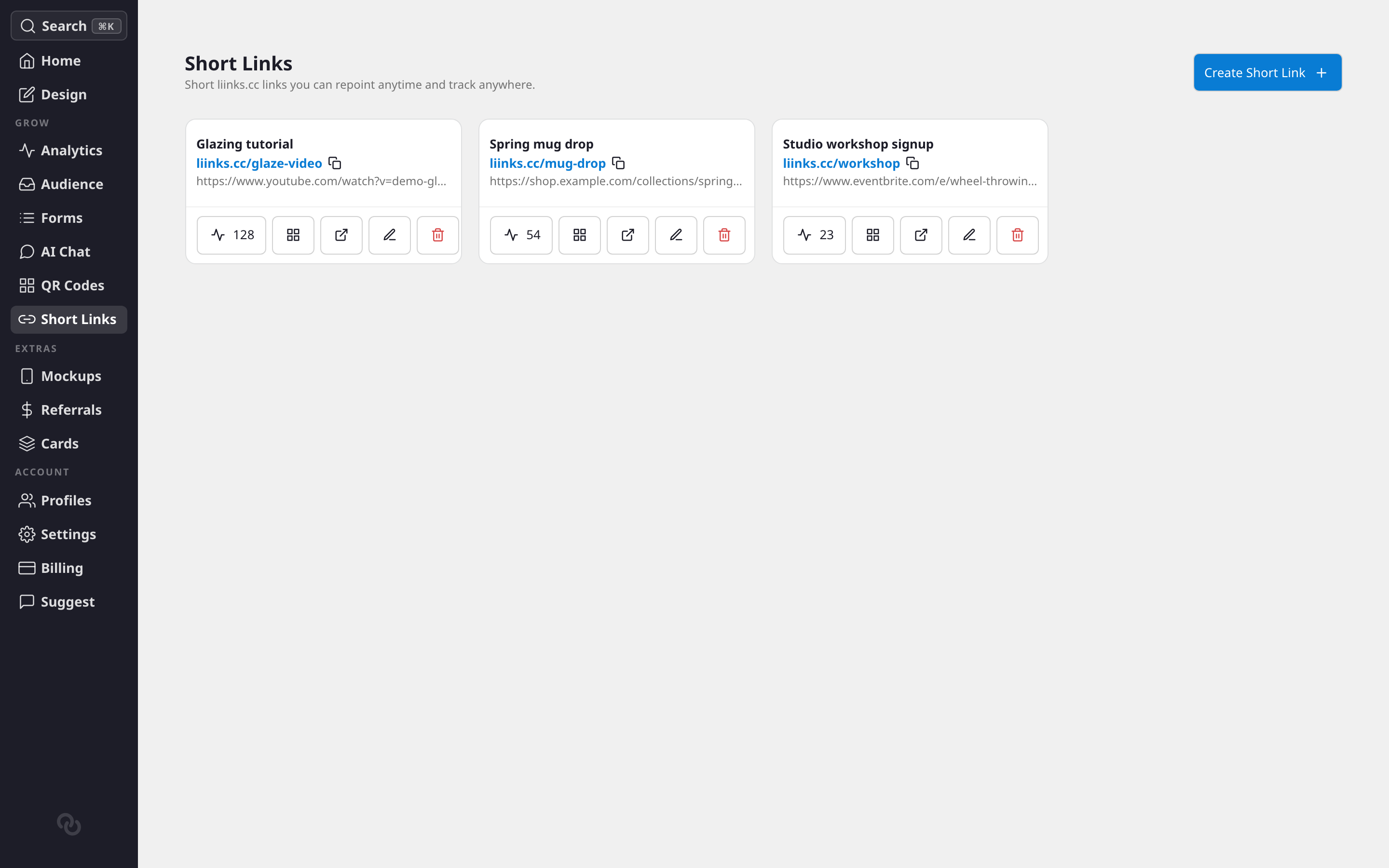
What makes Short Links useful
- Repoint anytime. The short URL stays the same forever, but you can change its destination whenever you like. If the link in your 100k-view video points to the wrong page, fix it in a couple of clicks. No reprinting, no re-uploading.
- Track every click. See how many times each short link has been opened, and where those clicks come from, without any extra setup.
- Share off your profile. These links live on their own short domain, so they're perfect for places where a full URL is clunky or where you want one clean link to hand out.
How to create a short link
- Go to the Short Links tab in your admin dashboard. You'll find it in the Grow section, just below QR Codes.
- Click Create Short Link.
- In Destination URL, paste the link you want to shorten. If you leave off the
https://, Liinks adds it for you. - Optionally add a Label — a private name that helps you recognize the link later in your dashboard. Visitors never see it.
- Click Create short link.
Liinks generates a short URL for you (something like liinks.cc/aB3xY7z) and adds it to your list. The short code is assigned automatically, so you don't need to think one up.
Managing your short links
Each short link appears as a card showing its label, its short URL, and where it currently points. From each card you can:
- Copy the short URL with one click, ready to paste anywhere.
- Open the link in a new tab to test it.
- Edit it to repoint the destination or rename the label. Changes take effect immediately.
- View analytics to see its click count and breakdowns (see below).
- Delete it. Deleting a short link stops it working for anyone who has it, so only remove links you're sure are no longer in use. This can't be undone.
Repointing a link
Repointing is the whole point of a short link. Click Edit on any link, change the Destination URL, and save. Everyone who opens that short URL now lands on the new destination, including people who saved it, printed it, or shared it earlier. The short link itself never changes.
Short link analytics
Click the analytics icon on any short link to open its stats. You'll see:
- Clicks over time — How often the link has been opened.
- Click locations — The countries your clicks are coming from.
- Click sources — Where people are clicking from.
This is the same analytics surface as your profile links, so all of your click data lives in one place.
Turn a short link into a QR code
Any short link can become a QR code in one click. On a short link's card, choose Get QR code and Liinks creates a QR code baked to that short URL and opens it in QR Studio to design.
Because the QR points at your short link, you get the best of both worlds: the printed QR pattern never changes, while you can still repoint the destination and see clicks at the short-link level. It's an easy way to put a repointable, trackable code on print materials. If you've already made a QR code for a link, the button reopens that same code instead of creating a duplicate.
A note on safety
Liinks scans every destination URL when you create or repoint a short link. If a URL is flagged as unsafe, we'll ask you to use a different one. In rare cases a link can be disabled after the fact if its destination is later found to be harmful — you'll see a Disabled badge and a short explanation on the card if that happens.
Pricing
Short Links are included with every paid Liinks plan. If you don't have an active subscription yet, you'll see a preview of the feature with the option to subscribe and unlock it.