We’re thrilled to announce a brand-new feature for our Pro plan users: Link to Page! 🎉
With "Link to page," you can now create direct links to any specific page on your Liinks profile. This means more control and precision in guiding your audience exactly where you want them to go. Whether it's a shop page, a portfolio, or a special announcement, you can easily share the direct link using a # at the end of your Liinks URL.
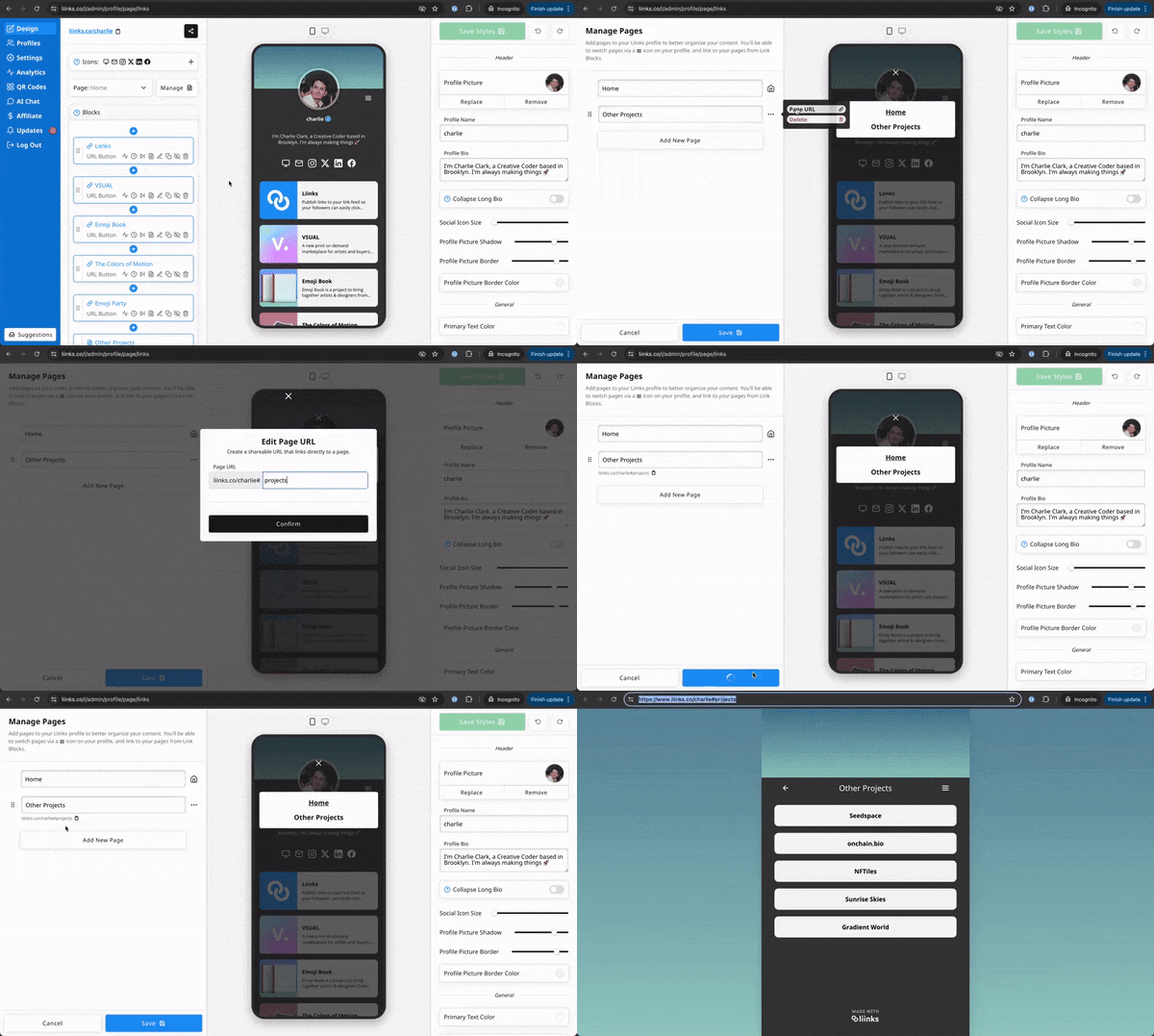
How does it work?
- Click on the Manage button to manage your pages.
- Hover over the "..." icon to bring up the menu for a page.
- Click the "Page URL" button.
- Choose a custom identifier for your page.
- Save your changes.
Once you've set up a custom identifiers, you can link directly to that page. For example: 👉 liinks.co/username#page
This powerful feature is exclusive to our Pro plan users and opens up new possibilities for customizing your link-in-bio experience.
Ready to take your profile to the next level? Start using "Link to Page" today!